Exploring the Different Types of Bluetooth Devices
Published: 24 Nov 2025
Tired of Bluetooth devices that disconnect randomly or don’t operate as expected? You are not alone. Many consumers confront these issues because they are unfamiliar with the various types of Bluetooth devices available and how they work. This article will help you understand them, allowing you to quickly choose the best one.
What are Bluetooth Devices?
Bluetooth devices employ wireless technology to connect over short distances. They do not require wires or the internet to function. Bluetooth technology is used in headphones, speakers, laptops, smartwatches, and even cars. These devices can share data, stream audio, and control other devices wirelessly.
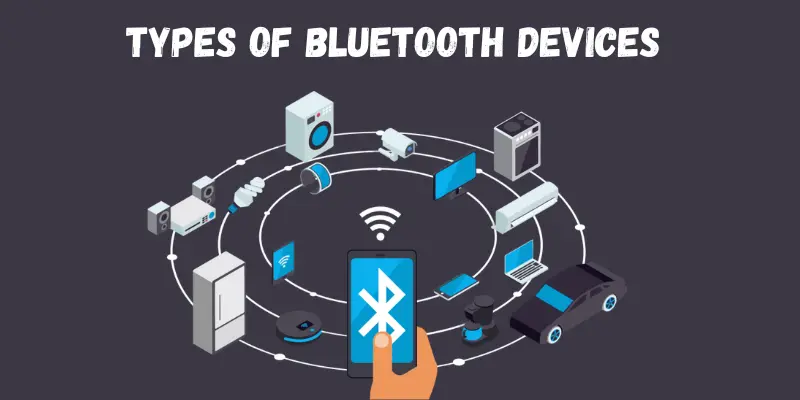
Types of Bluetooth Devices
You might be amazed at how many different types of Bluetooth devices exist. Most likely, you already have one or two Bluetooth gadgets in your home. Here’s an overview of some of the most common types of Bluetooth devices.
1. Bluetooth Speakers
Bluetooth speakers come in a variety of shapes and sizes, from small portable speakers that can be carried with you on the go to bigger ones meant for use at home or at the workplace. Most Bluetooth speakers produce high-quality sound, making them excellent for listening to music, podcasts, or even watching movies or television shows.
2. Bluetooth Keyboards
Bluetooth keyboards are wireless keyboards that link to your computer, tablet, or smartphone using Bluetooth. They’re great for people who want the ease of a wireless keyboard without the effort of creating a separate wireless connection. Bluetooth keyboards come in a variety of sizes and shapes, so you’re likely to find one that meets your needs.
3. Smartwatches
Smartwatches are another sort of Bluetooth device that is gaining popularity. These watches usually have many of the same functionalities as smartphones, such as the ability to make and receive calls, send and receive text messages, and use apps. Most smartwatches offer fitness tracking capabilities, and some even have built-in GPS, allowing you to track your runs or bike rides without carrying your phone.
4. Bluetooth Mice
Bluetooth mice are wireless input devices that connect to your computer, laptop, or tablet via Bluetooth, providing a clean, cable-free workspace. They are ideal for those who demand portability or do not want to bother with tangled cords. Bluetooth mice offer the same capabilities as a corded mouse, but with greater comfort and flexibility, whether for business work or recreational browsing.
However, they require regular charging or battery replacement and may experience temporary connectivity issues if the Bluetooth signal is weak. With these minor errors, Bluetooth mice are an excellent choice for users seeking mobility and comfort.
5. Bluetooth Game Controllers
Bluetooth game controllers are wireless devices that link to gaming consoles, PCs, and mobile devices over Bluetooth, allowing you to play games without the need for cords. They provide the same controls as corded controllers, but with the extra advantage of freedom of movement and a clutter-free configuration.
Bluetooth game controllers work with a variety of systems, making them great for playing on the move or at home. However, they may experience temporary connectivity troubles and require charging or battery replacement. With these little issues, they offer a great gaming experience with wireless convenience.
6. Bluetooth Data Transfer Devices
Bluetooth data transfer devices enable the wireless transfer of files between devices such as mobile phones, PCs, and tablets. They are useful for transporting data without the use of cables or internet connections. However, they may be slower than cable transfers and may encounter connectivity problems over extended distances.
7. Bluetooth Earbuds
Bluetooth earbuds are small wireless audio devices that connect to your phone, tablet, or computer using Bluetooth. They provide the convenience of hands-free listening, making them great for exercise, commuting, and casual listening. Bluetooth earbuds are small, lightweight, and frequently include capabilities such as noise cancellation and touch controls.
However, they require charging and may have a shorter battery life than wired choices, and the sound quality may not always be comparable to high-end wired headphones. Despite these shortcomings, they offer great portability and wireless flexibility.
How to Choose the Right Type of Bluetooth Device
Choosing the right Bluetooth device depends on what you need it for. Here are some quick tips to help you decide:
1. Know Your Need
Start with a simple question: What do you want it for?
- Music? Choose Bluetooth speakers or headphones.
- Work? Go for Bluetooth keyboards or mice.
- Fitness? Try a Bluetooth smartwatch or tracker.
- Hands-free calls in your car? Get a Bluetooth car kit.
2. Check Compatibility
- Make sure the device works with your phone, computer, or TV.
- Always check the device specs before you buy.
3. Look for the Right Bluetooth Version
- Bluetooth 5.0 or higher gives you better speed, range, and power-saving.
- For simple tasks like file sharing or audio, Bluetooth 4.0 still works well.
- For fitness or health gadgets, Bluetooth Low Energy (BLE) is ideal.
4. Battery Life Matters
Choose a device with long battery life so you don’t have to charge it often.
5. Range and Signal Strength
If you need to use the device from far away (like a speaker in a big room), look for one with a strong signal and long range.
Common Mistakes to Avoid When Buying a Bluetooth Device
Buying a Bluetooth device seems easy, but many people make small mistakes that lead to big problems later. Don’t worry. Here’s what to watch out for:
1. Not Checking Compatibility
Many people overlook compatibility and assume all Bluetooth devices work with their phone or system. In reality, some devices may only work with specific operating systems or devices.
2. Choosing an Older Bluetooth Version
Older Bluetooth versions, like Bluetooth 3.0 or 4.0, may be cheaper but come with slower speeds, shorter ranges, and higher energy consumption compared to newer versions.
3. Ignoring Battery Life
A Bluetooth gadget with a short battery life can be very difficult, especially if you use it for extended durations. Devices with low battery lives may need to be recharged more frequently.
4. Overlooking Sound and Build Quality
A Bluetooth device might look good on paper, but if the sound quality is poor or the build feels flimsy, it won’t last long or provide the experience you’re hoping for.
5. Skipping Essential Features
Failure to pay attention to critical characteristics such as noise cancellation, water resistance, or hands-free calling might lead to disappointment. Some gadgets may lack the features required for everyday use.
Conclusion
In this article, we’ve discussed the various types of Bluetooth devices in detail. Consider what qualities are most important to you, such as sound, range, or battery life. The greatest Bluetooth gadgets strike a balance between performance and comfort. Consider newer versions with Bluetooth 5.0 for faster, more consistent connections. Now that you have all the information, take a look at the best Bluetooth devices available and make an informed decision.
Frequently Asked Questions (FAQs)
Bluetooth versions, such as 4.0 and 5.0, as well as BLE (Bluetooth Low Energy), control speed, range, and power consumption. Bluetooth 4.0 or higher is sufficient for most tasks. Bluetooth 5.0 offers better performance and a longer range.
Bluetooth Low Energy (BLE) is designed for devices with low power requirements, such as fitness trackers and health gadgets. It works effectively with devices that do not require fast speeds or huge data transfers. BLE enables gadgets to last longer on a single battery.
The range of Bluetooth devices is typically around 10 meters (33 feet). To extend the range, place your devices in line of sight and keep them away from obstacles, such as walls. You can also consider devices with higher range specifications.
Bluetooth is classified into three types: Classic Bluetooth (BR/EDR) for normal data transfer, Bluetooth Low Energy (BLE) for power-efficient devices, and Bluetooth 5.0 (and higher) for faster, longer-range, and more capabilities. Each variety is designed to meet specific needs in terms of performance and energy consumption.
Bluetooth devices are generally secure, but it is critical to pair them correctly to prevent illegal use. Always utilise secure pairing techniques, such as passcodes or PINs, for added security. Updating your Bluetooth program also helps to protect against vulnerabilities.





- Be Respectful
- Stay Relevant
- Stay Positive
- True Feedback
- Encourage Discussion
- Avoid Spamming
- No Fake News
- Don't Copy-Paste
- No Personal Attacks
- Be Respectful
- Stay Relevant
- Stay Positive
- True Feedback
- Encourage Discussion
- Avoid Spamming
- No Fake News
- Don't Copy-Paste
- No Personal Attacks
