Different Types of Modems
Published: 1 Oct 2025
Are you confused about the various varieties of modems available today? With so many possibilities, such as DSL, cable, and fiber-optic modems, selecting the perfect one might be difficult. In this article, we’ll break down each type so you can grasp the differences and choose the ideal modem for your needs. Here, you’ll also learn about the different types of modems in detail.
What is a Modem?
A modem is the device that links your home or business network to the internet. It receives the signal from your internet service provider (ISP) and translates it into a format that your devices can understand. Essentially, a modem connects you to the internet by translating data between your ISP and your network, whether via cable, DSL, or fiber-optic connection.
To get the best performance, your modem setup should also include quality network cables, as they ensure stable and fast data transfer between your devices.
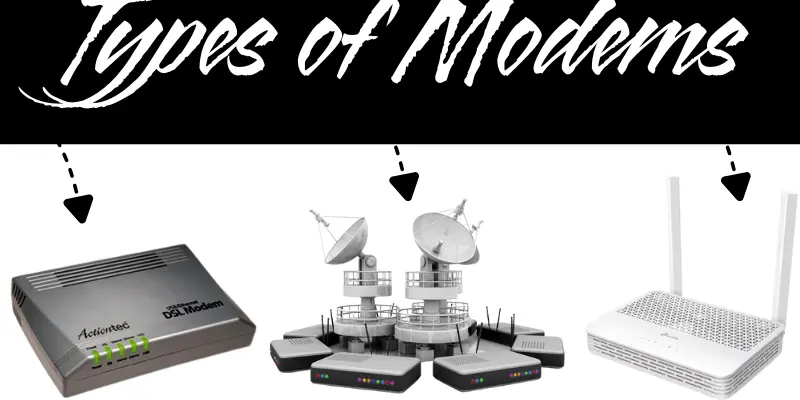
Types of Modems
Here are the different types of modems as follows:
1. DSL Modem
- Connection: Uses a standard telephone line to connect to the internet.
- Speed: Offers speeds faster than dial-up but slower than cable and fiber-optic modems.
- Distance Sensitivity: Speed decreases the further you are from the provider’s central office.
- Reliability: Provides a stable connection for general browsing, light streaming, and email.
- Cost-Effective: Typically more affordable than cable and fiber-optic modems.
- Availability: Available in areas where broadband services like cable or fiber are not present.
- Setup: Easy to install with minimal technical setup.
- Best For: Light internet use, including browsing, emailing, and basic streaming.
2. Cable Modem
- Connection: Uses a coaxial cable, typically the same cable that delivers television signals, to connect to the internet.
- Speed: Provides faster speeds than DSL modems, suitable for high-speed internet activities like streaming and gaming.
- Reliability: More stable than DSL, especially for areas with high bandwidth usage.
- Availability: Available in areas with cable TV service, offering wider availability in urban areas.
- Cost: Slightly more expensive than DSL modems but still affordable for most households.
- Best For: Users needing reliable, high-speed internet for streaming, gaming, and multiple device connections.
- Setup: Easy to install, often provided by internet service providers with self-installation kits.
- Upgrade Options: Newer DOCSIS 3.0 and DOCSIS 3.1 cable modems support faster speeds and future-proof your connection.
If you download large files or movies, pair your cable modem with reliable storage devices to save everything safely.
3. Fiber-Optic Modem
- Connection: Uses fiber-optic cables to deliver internet signals via light, providing high-speed data transmission.
- Speed: Offers ultra-fast speeds, often exceeding 1 Gbps, making it ideal for demanding tasks like HD streaming, gaming, and large file downloads.
- Reliability: Extremely reliable with minimal signal degradation over long distances, unlike traditional copper-based modems.
- Availability: Available in select areas with fiber-optic infrastructure, often in urban and tech-forward regions.
- Cost: Generally more expensive than DSL and cable modems but provides excellent value for high-speed internet needs.
- Best For: Users with high-speed internet demands, such as large households, businesses, or data centers.
- Setup: Requires professional installation to connect to fiber-optic lines, but the setup process is typically straightforward.
- Future-Proof: Fiber-optic technology offers long-term benefits, handling future increases in bandwidth demand.
4. Satellite Modem
- Connection: Uses satellite technology to connect to the internet, transmitting data through satellites in space.
- Speed: Provides decent speeds, but typically slower compared to cable and fiber-optic modems.
- Reliability: Performance can be affected by weather conditions such as rain or snow, causing intermittent connectivity.
- Availability: Ideal for remote or rural areas where other internet connection options like DSL, cable, or fiber are unavailable.
- Cost: More expensive than DSL and cable modems, mainly due to installation and service costs.
- Best For: Users in rural or hard-to-reach areas with limited access to wired broadband services.
- Setup: Requires satellite dish installation, which may need professional help.
- Latency: Higher latency (delay) than other types of modems, which can impact real-time activities like gaming or video conferencing.
If you live in remote areas, carrying a power bank is also useful to keep your devices powered while staying connected.
5. USB Modem
- Connection: Connects to your computer or laptop via a USB port to provide internet access.
- Speed: Provides moderate speeds, usually suitable for light browsing and checking emails.
- Portability: Compact and portable, making it a good option for users who need internet on the go.
- Reliability: Can be less reliable compared to other types of modems, especially if using a cellular USB modem with limited coverage.
- Availability: Often used for mobile hotspots or as an emergency internet solution in areas with weak Wi-Fi or broadband connections.
- Cost: Typically affordable and budget-friendly, especially for temporary or on-the-go internet needs.
- Best For: Travelers or users in remote areas who need a portable and temporary internet connection.
- Setup: Easy to set up by simply plugging into the USB port; no complex installation is needed.
- Data Plans: Many USB modems rely on mobile data plans, so the cost depends on data usage and coverage.
6. Dial-up Modem
- Connection: Uses a standard telephone line to establish an internet connection, typically requiring a phone number to dial into the ISP.
- Speed: Very slow compared to modern broadband modems, with maximum speeds usually around 56 Kbps.
- Reliability: Reliable in areas where no other internet options are available, but can be prone to interruptions if the phone line is in use.
- Availability: Still used in remote areas where broadband or DSL options are not available, though it’s becoming outdated.
- Cost: Low-cost option, both for the hardware and the service, though the speed is limited.
- Best For: Users in extremely remote locations where no broadband or DSL services are offered.
- Setup: Simple to set up, requiring just a phone line and a dial-up modem, though installation might need some basic configuration.
- Limitations: High latency, poor performance for tasks like video streaming or gaming, and the internet connection can be interrupted by phone calls.

How to Choose the Right Type of Modem
Choosing the right type of modem depends on your internet needs, the type of connection available, and the speed you require. Here’s a simple guide to help you make the right choice:
1. Know Your Internet Connection Type
- DSL Modem: Suitable for basic home usage with speeds up to 100 Mbps.
- Cable Modem: Best for faster speeds, ideal for HD streaming, gaming, and heavy internet usage.
- Fiber-optic Modem: Provides ultra-fast speeds, perfect for large file downloads and multiple devices.
2. Consider Speed Requirements
- For fast gaming, streaming, or heavy usage, choose a cable or fiber-optic modem.
- For light browsing and casual streaming, a DSL modem should be enough.
3. Check Compatibility with Your ISP
- Make sure the modem is compatible with your internet service provider (ISP) and supports your specific plan.
4. Look for Modem-Router Combos
- Some modems come with built-in routers. These are ideal for saving space and simplifying setup, especially in small homes or apartments.
5. Future-Proofing
- Choose a modem that supports faster speeds and newer technologies, such as DOCSIS 3.1 for cable modems, to enhance lifetime and prevent frequent upgrades.
Common Mistakes to Avoid When Buying a Modem
“Many people rush into buying a modem and end up with the wrong choice—let’s look at the most common mistakes you should avoid.
1. Choosing the Wrong Type of Modem
- Make sure the modem matches your internet connection type (DSL, cable, or fiber-optic). Choosing the wrong one can result in slower speeds or no connection.
2. Not Checking ISP Compatibility
- Not all modems work with every internet service provider (ISP). Always check if your chosen modem is compatible with your ISP to avoid compatibility issues.
3. Overlooking Speed Requirements
- Buying a modem with lower speeds than you need can result in slower internet. Ensure your modem supports the speed your internet plan offers.
4. Ignoring Future-Proofing
- Purchasing an outdated modem may limit your future internet speed upgrades. Look for newer devices that offer faster speeds and technology, such as DOCSIS 3.1 for cable modems.
5. Opting for a Modem-Only Device When You Need Wi-Fi
- If you need wireless access, avoid purchasing a modem without built-in Wi-Fi. Consider a modem-router combo or a separate router if needed.
6. Choosing Cheap, Low-Quality Modems
- A low-cost modem may save you money initially, but it can result in weak speeds, frequent problems, and poor reliability. To ensure a smoother experience, invest in a high-quality modem.
7. Ignoring Firmware Updates
- Some modems come with outdated firmware. Ensure the modem supports easy updates or comes with the latest firmware for better performance and security.
Conclusion
So, in this article, we explored the many types of modems in detail. I recommend a cable modem if you want to strike a balance between speed and price, but a fiber-optic modem will provide the finest long-term performance. Always check that the modem meets your individual needs and internet speed requirements. Now it’s your turn to take the next step and get the correct modem for your internet connection.
Frequently Asked Questions (FAQs)
Here are some common questions and answers about the different types of modems to help you understand them better
There are different types of modems, including external modems, internal modems, cable modems, DSL modems, satellite modems, half-duplex modems, four-wire modems, and two-wire modems.
The two main types of modems used in computers are: Dial-up Modem and Broadband Modem.
The best type of modem depends on your specific needs and internet plan. Here are some of the best modems:
- Fiber-Optic Modem
- Cable Modem
- DSL Modem
- Satellite Modem
Fiber-optic modems are the best choice for high-speed internet. They provide ultra-fast speeds, ideal for heavy streaming, gaming, and large data transfers.
A cable modem or fiber-optic modem is ideal for gaming, as they provide faster and more stable connections, reducing lag and buffering during online gaming.






- Be Respectful
- Stay Relevant
- Stay Positive
- True Feedback
- Encourage Discussion
- Avoid Spamming
- No Fake News
- Don't Copy-Paste
- No Personal Attacks
- Be Respectful
- Stay Relevant
- Stay Positive
- True Feedback
- Encourage Discussion
- Avoid Spamming
- No Fake News
- Don't Copy-Paste
- No Personal Attacks
