Different Types of Network Cable
Published: 23 Sep 2025
Network cables are the cords that link your electronic devices to the Internet. They provide the rapid and secure transfer of data from one location to another. There are various sorts of network cables, and each works in its own way. Some are better suited to families, while others function best in large offices. In this article, you’ll learn about the many types of network cables and which one is best for you.
What is a Network Cable?
A network cable is a wire that connects devices, such as computers, routers, and switches, allowing them to share data and access the internet. It transmits data between devices rapidly and securely. Wired networks are built using network connections in homes, companies, and data centers. They contribute to the development of strong and solid relationships. Network cables are also used in systems like security cameras, where stable connections are important for smooth video transmission.
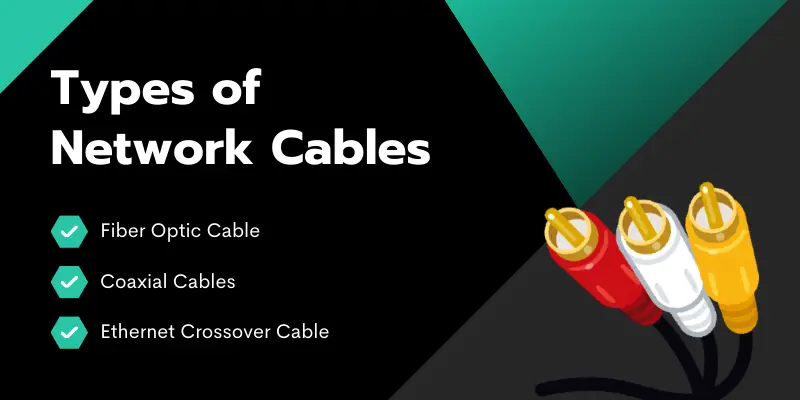
Types of Network Cables
When it comes to creating a solid and fast network, selecting the right type of network cable is critical. Various cables have been designed for specific tasks, speeds, and distances. Here’s a quick overview of the major types of network cables:
1. Fiber Optic Cable
Fiber Optic Cable transfers data by light signals, making it faster and more dependable than traditional copper connections. It maintains high speeds over long distances with no signal loss and is resistant to electrical interference. While more expensive, it is ideal for high-speed internet and large-scale networks, with superior performance for demanding applications such as data centers. These setups often work hand in hand with storage devices to handle and transfer massive amounts of information efficiently.
2. Coaxial Cables
Coaxial cable is a form of electrical cable that transmits data, video, and audio signals. It consists of a center conductor, an insulating layer, a metal shield, and an outer insulating layer. Coaxial cables are widely used in cable television, internet connectivity, and other broadband applications. While not as fast as fiber optic connections, they provide a strong and dependable connection for the majority of household and business configurations. Coaxial cables are inexpensive, simple to install, and reliable over moderate distances.
3. Ethernet Crossover Cable
An Ethernet crossover cable is a network cable that connects two devices directly, such as two computers or switches, without the use of a router or hub. Unlike a typical Ethernet cable, which links devices to a central network, a crossover cable flips the transmitting and receiving pins, allowing devices to communicate directly.
It is especially useful for file transfers, networking two PCs, and connecting two switches in specific network configurations. While it is less often used nowadays due to improvements such as auto-sensing ports, it might still be useful for specific conditions.
4. Shielded Twisted Pair Cables
These Ethernet cables, also known as STP cables, are usually used in corporate setups. They were designed for computer networks and are ideal for places with high interference. Shielded twisted pair cables are also utilized to extend the distance between cables.
STP cables are made up of colored wires that have been twisted together to form pairs. Typically, shielded twisted pair cables are made up of four colorful pairs of wires wrapped in metal shields and a single plastic sheath.
5. Cat5e, Cat6, Cat6a, and Cat7 Cables
Cat5: Supports speeds up to 100 Mbps. It’s outdated and mostly replaced by newer cables, but it is still found in older setups. Suitable for basic home networks.
Cat5e: An enhanced version of Cat5, which supports 1 Gbps speeds. Offers better performance and resistance to interference, making it ideal for residential and small office networks.
Cat6: Supports 1 Gbps speeds up to 100 meters and 10 Gbps for shorter distances (55 meters). Provides faster speeds and better performance than Cat5e, ideal for home offices and high-speed internet.
Cat6a: Supports 10 Gbps speeds over longer distances (up to 100 meters). Provides enhanced shielding, reducing interference, and is perfect for larger networks and future-proofing.
Cat7: Supports 10 Gbps speeds over 100 meters with superior shielding to prevent interference. Best suited for demanding environments like data centers and high-performance networks.
Cat8: Supports 25 Gbps to 40 Gbps speeds but only for short distances (up to 30 meters). Ideal for data centers and environments requiring ultra-fast data transfer.
How to Choose the Right Type of Network Cables
Choosing the right network cable can feel confusing, but it’s actually easy if you know what to look for. Here are a few things that can help you make the right choice:
1. Know Your Speed Needs
Do you need fast internet for gaming or streaming? Go for Cat6 or Cat6a cables. They handle higher speeds and reduce lag.
2. Think About Distance
Longer cables can slow down your connection. If you’re setting up a large area, use Cat6a or Cat7, which work better over longer distances.
3. Check Your Devices
Older devices may only support Cat5e cables. Newer routers and computers can handle Cat6 or Cat7 for better speed.
4. Look at the Environment
Placing cables near power lines or machines? Choose shielded cables (like STP) to avoid interference.
5. Plan for the Future
Don’t just buy for today. If you’ll upgrade your internet later, get a better cable now. Cat6a or Cat7 is a safe, long-term pick.
Common Mistakes to Avoid When Buying a Network Cable
Buying a network cable may seem simple, but one wrong choice can mess up your connection. Here are some common mistakes people make and how to avoid them:
1. Picking the Wrong Category
Not all cables are the same. Some people buy Cat5 thinking it’s enough, but it’s outdated. For better speed and performance, go with Cat6 or higher.
2. Ignoring Cable Length
Too short? It won’t reach. Too long? It may slow down your signal. Measure the distance before you buy.
3. Forgetting About Shielding
If you’re placing cables near electrical devices, avoid UTP (unshielded cables). Instead, use STP (shielded cables) to prevent signal problems.
4. Buying Cheap, Low-Quality Cables
Low-cost cables might look fine, but they often break or perform poorly. Invest in a trusted brand with good reviews.
5. Overlooking Connector Type
Most network cables use RJ45 connectors, but always double-check that the cable matches your devices.
6. Not Thinking About Future Use
If you’ll upgrade your internet or set up later, don’t buy the bare minimum. Choose a cable that supports higher speeds and bandwidth.
Conclusion
So, in this article, we’ve discussed the various types of network cables in detail. If you’re searching for a solid choice, I recommend Cat6 cables. They’re fast, dependable, and suitable for most home or business applications. Just make sure to avoid common mistakes, like using the wrong length or choosing low-quality brands, as these can slow down your connection.
Always select cables that match your speed and setup needs. Ready to upgrade your network? Start exploring your options today! Keep learning, stay curious, and take control of your tech. The right cable can make all the difference.
Frequently Asked Questions (FAQs)
It depends on your internet speed and the distance you need to go. Cat5e is suitable for basic use; however, Cat6 or Cat7 is ideal for high-speed internet. To ensure that the cable is compatible with your router and device, check the specifications.
If you’re a gamer or stream high-quality videos, Cat6 or Cat6a cables are ideal. They support faster speeds and better performance. They help reduce lag and improve overall connection quality.
Cat5 can handle speeds of up to 100 Mbps; however, it is no longer suitable for high-speed internet. If you’re paying for speeds greater than 100 Mbps, you should utilize Cat6 or higher for better performance and reliability.
Yes, outdoor cables should be UV-resistant and weather-proof. STP (Shielded Twisted Pair) cables are also suitable for use in areas with electrical interference. To avoid damage, make sure you buy outdoor-rated cables.
While you can mix cables, it is better to stick to the same category (for example, use Cat6 cables throughout). Mixing cables of varying performance levels can slow down the total connection. For optimal results, keep your cables consistent.





- Be Respectful
- Stay Relevant
- Stay Positive
- True Feedback
- Encourage Discussion
- Avoid Spamming
- No Fake News
- Don't Copy-Paste
- No Personal Attacks
- Be Respectful
- Stay Relevant
- Stay Positive
- True Feedback
- Encourage Discussion
- Avoid Spamming
- No Fake News
- Don't Copy-Paste
- No Personal Attacks
