Types of Operating Systems You Must Know: Functions, Pros & Cons Explained
Published: 11 Dec 2025
An operating system (OS) is the backbone of every computer and smart device. It manages hardware, software, and user interactions, making your device work smoothly. Understanding the types of operating systems is essential for students, IT professionals, and tech enthusiasts alike. In this guide, we’ll explore the major sorts of operating systems, their functions, advantages, disadvantages, and real-life examples, helping you choose the right OS for your needs.
What is an Operating System?
An operating system (OS) is software that serves as a link between a computer’s hardware and its user. It handles all hardware and software resources, enabling you to run apps, manage data, and complete activities more efficiently.
Key Functions of an OS:
- Memory Management: Controls and shares memory for programs.
- Processor Management: Schedules tasks and manages CPU usage.
- File Management: Organizes, stores, and retrieves data on storage devices.
- Input/Output Management: Handles communication with devices like keyboards, printers, and displays.
- User Interface: Provides an easy way for users to interact with the computer, like graphical (GUI) or command-line interfaces (CLI).
Example: When you use your smartphone, laptop, or tablet, the OS (like Windows, macOS, Linux, or Android) ensures everything runs smoothly, from opening apps to saving files.
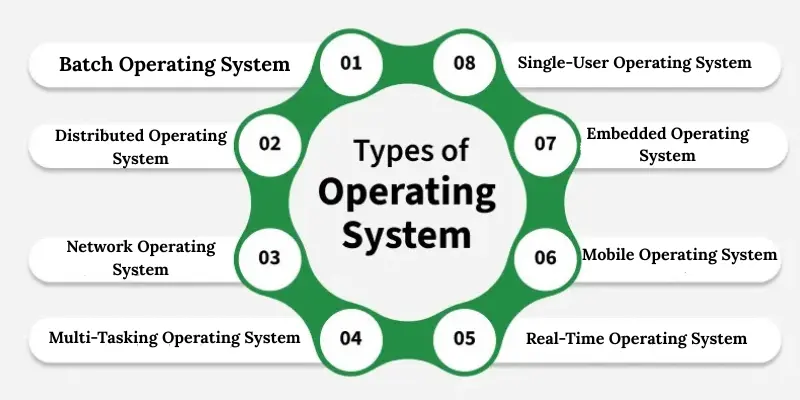
Types of Operating Systems
Operating systems come in different types, each designed to handle specific tasks and user needs. Understanding these types helps you choose the right OS for your device or work.
1. Batch Operating System
A Batch Operating System runs jobs in batches without user interaction. Users submit tasks, and the OS executes them one by one, saving time on repetitive processes. It is commonly used in large businesses and mainframes. This OS is simple and efficient, but not suitable for real-time operations.
2. Time-Sharing Operating System (Multitasking OS)
Time-Sharing OS allows multiple users to access a computer simultaneously by sharing CPU time. Each user gets a small time slice, making it efficient and fast. It’s widely used in universities, research labs, and online services. This OS improves productivity and supports multitasking.
3. Distributed Operating System
A Distributed Operating System (OS) manages a collection of independent computers and presents them as a single system. Tasks and resources are shared across multiple machines to boost performance and reliability. It is widely used in cloud computing, server clusters, and scientific research. This OS ensures better resource utilization and system dependability.
4. Network Operating System (NOS)
Network OS allows multiple computers to communicate and share resources like files, printers, and applications over a network. It’s commonly used in offices and organizations for centralized management. Examples include Windows Server and UNIX-based NOS. It provides security, easy access, and smooth collaboration.
5. Multi-Tasking Operating System
A multi-tasking OS lets a single user run multiple applications at the same time. For example, you can browse the internet while listening to music and editing documents. Windows and macOS are popular examples. This OS increases efficiency and saves time for users.
6. Multi-User Operating System
A Multi-User OS allows multiple users to use a computer simultaneously without affecting each other’s tasks. It manages resources efficiently to ensure smooth performance for all users. UNIX and Linux are popular examples. This OS is ideal for businesses and server environments.
7. Real-Time Operating System (RTOS)
Real-Time operating systems process data in real time and are utilized in situations when quick answers are required. Examples include medical gadgets, industrial machines, and air traffic control systems. It enables accurate task execution and excellent reliability. This OS is required for mission-critical applications.
8. Mobile Operating System
Mobile OS is designed for smartphones, tablets, and gadgets. Popular examples are Android and iOS. It manages apps, memory, touch input, and connectivity effectively. Mobile OS offers a seamless, user-friendly experience for everyday tasks.
9. Embedded Operating System
Washing machines, smart TVs, and GPS systems all have embedded operating systems that are designed to serve specific tasks. It’s lightweight, efficient, and dependable. Examples include RTOS for embedded systems. This operating system facilitates the smooth operation of specialized devices.
10. Single-User Operating System
A Single-User OS is designed for one user at a time to perform tasks like editing documents or browsing. Windows and macOS desktops are common examples. It’s simple, easy to use, and ideal for personal computers.
11. Server Operating System
Server OS manages network resources, servers, and data efficiently for multiple clients. Examples include Windows Server, Ubuntu Server, and Red Hat Enterprise Linux. It ensures security, stability, and resource management in organizations.
12. Desktop Operating System
A Desktop OS is designed for personal computers and laptops to manage hardware and software. Windows, macOS, and Linux are common examples. It provides a user-friendly interface and supports multitasking for daily computing needs.
How to Choose the Right Operating System
Choosing the right operating system depends on your device type, tasks, and user needs. Here are some tips to help you decide:
- Consider Your Device: Desktop, laptop, server, or mobile device? Each requires a different OS, like Windows, macOS, Linux, Android, or iOS.
- Identify Your Tasks: For gaming, multimedia, or office work, choose an OS that supports the applications you need.
- Check Compatibility: Ensure the OS is compatible with your hardware and software requirements.
- Evaluate Performance & Security: Some OS, like Linux and macOS, are more secure, while Windows offers broad compatibility.
- Look at User-Friendliness: Beginners may prefer Windows or macOS, while advanced users may choose Linux or a real-time OS.
By understanding your needs and device capabilities, you can pick an OS that improves efficiency, security, and overall experience.
Conclusion
Understanding the different types of operating systems helps you choose the best OS for your device and tasks. Each OS type, desktop, mobile, real-time, or distributed, has its own features, advantages, and use cases. Knowing their functions, pros, and cons allows you to make informed decisions for personal, professional, or business purposes. Whether you are a beginner, student, or IT professional, selecting the right operating system enhances performance, security, and productivity.
Frequently Asked Questions (FAQs)
Want to learn more about operating systems? Here are some common questions and answers to help you understand OS types, functions, and their uses better.
Windows is ideal for gaming due to its high compatibility with games, hardware, and graphics drivers.
Mobile OS (like Android and iOS) is designed for touch devices and apps, while desktop OS (like Windows and Linux) supports full-featured software and multitasking.
Linux and macOS are considered more secure than others because of their robust architecture and fewer vulnerabilities.






- Be Respectful
- Stay Relevant
- Stay Positive
- True Feedback
- Encourage Discussion
- Avoid Spamming
- No Fake News
- Don't Copy-Paste
- No Personal Attacks
- Be Respectful
- Stay Relevant
- Stay Positive
- True Feedback
- Encourage Discussion
- Avoid Spamming
- No Fake News
- Don't Copy-Paste
- No Personal Attacks
