7 Types of System Software (Easy Guide with Real Examples)
Published: 14 Apr 2026
Think about this… You turn on your computer or mobile, but nothing works.
No apps open, no files show—just a useless machine.
This is where system software comes in. It is the main software that makes your device work. It connects the hardware (like the CPU and keyboard) with the user. In simple words, without system software, a computer is just a box with no use.
Whenever you open an app, play a game, or use the internet, system software is working quietly in the background.
If you want to understand software in more detail, you can also read about types of software to see how system, application, and programming software are different from each other.
In this article, you will learn the types of system software in very easy words with real-life examples. So, you can clearly understand how your computer actually works.
What is System Software?
System software is the main software that runs your computer and controls all its basic functions. It works as a bridge between the user, the hardware (like the CPU or keyboard), and the applications (like the browser or games).
In simple words, system software tells the computer what to do and how to do it.
It does not work like normal apps that you open and use. Instead, it runs in the background and makes sure everything works smoothly. Without it, your computer or mobile device cannot even start.
Key Features of System Software
System software has some important features that make it different from normal apps. It works in the background and keeps your computer or mobile running smoothly. Without it, the system cannot function properly.
- Runs in the background: System software always works in the background, and you don’t directly interact with it.
- Controls Hardware: It manages hardware devices like the CPU, keyboard, mouse, and printer so everything works correctly.
- Supports Application Software: It enables application software such as browsers, games, and MS Word to run smoothly.
- Fast and Efficient: It is designed to work quickly and manage system resources in the best way.
- Close to Hardware: System software works very closely with computer hardware and controls low-level operations.
- Essential for System Startup: Your computer cannot start or function without system software like an operating system.
- Resource Management: It manages memory, storage, and CPU usage to avoid system overload.
- Multi-Device Support: It helps the system connect with different devices using drivers (like printers, scanners, etc.).
How System Software Works
System software works like the control center of your computer or mobile. It runs in the background and manages everything so the system can function smoothly. You don’t see it directly, but every action depends on it.
- Step 1: System Starts (Booting): When you press the power button, the system software starts first. It loads the operating system into memory.
- Step 2: Hardware Activation: It checks and activates hardware like CPU, keyboard, mouse, and storage devices.
- Step 3: User Interaction: When you give any command (open app, play video), system software receives it and processes it.
- Step 4: Resource Management: It manages CPU, memory, and storage so every task runs smoothly without errors.
- Step 5: Application Support: It provides support so application software (like browser, games, and MS Word) can run properly.
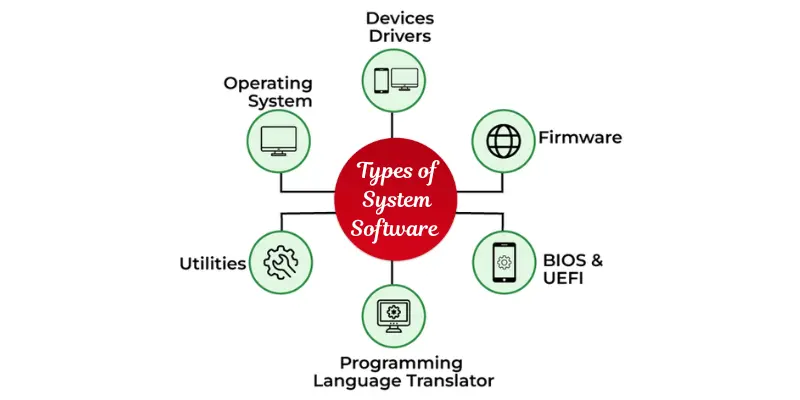
Types of System Software (Main SEO Section)
System software is divided into different types based on the work it performs. Each type has a special role in running and controlling the computer system. Together, they make your device fast, stable, and easy to use.
1. Operating System (OS)
The operating system is the most important type of system software. It manages the whole computer and acts as a bridge between the user and the hardware.
Functions:
- Manages memory and CPU
- Controls files and folders
- Runs application software
- Handles input/output devices
2. Device Drivers
Device drivers are small programs that help the computer communicate with hardware devices.
Functions:
- Connect hardware with the operating system
- Make devices work properly
- Convert commands into machine language.
3. Utility Software
Utility software helps in maintaining and protecting the system. It keeps your computer clean, fast, and secure.
Functions:
- Removes viruses and malware
- Cleans unwanted files
- Improves system performance
- Manages storage space
4. Firmware
Firmware is a special type of system software that is permanently stored in hardware devices.
Functions:
- Controls hardware at a basic level
- Helps in system booting
- Stored in ROM or flash memory
5. Language Translators
These are system programs that convert programming languages into machine language so the computer can understand them.
Types:
- Compiler
- Interpreter
- Assembler
Functions:
- Converts code into machine-readable form
- Helps programmers run their programs
- Detects errors in code
6. Boot Loader
The bootloader is a small but important system software that starts the operating system when you turn on your computer.
Functions:
- Starts the system booting process
- Loads the operating system into memory
- Initializes hardware before the OS starts
7. System Monitoring Tools
These tools track the performance of your computer in real time.
Functions:
- Shows CPU and memory usage
- Detects slow processes
- Helps improve system performance
Real-Life Examples of System Software
System software is used in almost every device we use daily. It works in the background and helps the system run smoothly. Below are simple and clear real-life examples
1. Windows Operating System
Windows is a very common system software used in computers and laptops. It controls the whole system and helps users open files, run apps, and use hardware devices like keyboards, mice, and printers. Without Windows or any operating system, a computer cannot work at all.
2. Android Operating System
Android is a system software used in mobile phones. It manages all mobile functions and allows users to run apps like WhatsApp, YouTube, and Instagram. It also controls hardware like the camera, touch screen, storage, and battery. Every smartphone needs Android or a similar OS to function properly.
3. Device Drivers
Device drivers are system software that help hardware devices work with the computer. For example, a printer driver helps your computer understand how to print documents. Without drivers, your system cannot communicate with external devices like printers, scanners, or graphics cards.
4. Antivirus Software
Antivirus is a type of system software that protects your computer from viruses and malware. It scans your system, removes harmful files, and keeps your data safe. It also helps improve system speed by removing unnecessary files and threats.
5. BIOS (Firmware)
BIOS is a basic system software stored inside the computer. It starts working as soon as you turn on your device. It checks hardware components and then loads the operating system into memory. Without a BIOS, the computer cannot boot.
6. DirectX (Gaming Support)
DirectX is system software used in gaming and multimedia. It helps games run smoothly by managing graphics, sound, and performance. Many modern games depend on DirectX for better speed and high-quality visuals.
Difference Between System Software & Application
| Feature | System Software | Application Software |
| Purpose | System run karna | User task |
| Example | OS | MS Word |
| Run | Background | User interaction |
Why System Software is Important
System software is very important because it controls the whole computer system and makes everything work properly. Here are the key reasons explained in simple bullet points
- System software is necessary to start and run a computer or mobile device.
- It controls all hardware components like CPU, keyboard, mouse, printer, and storage.
- It allows application software like browsers, games, and MS Word to work properly.
- It manages system resources such as memory, CPU, and storage for smooth performance.
- It improves system speed and helps prevent crashes and errors.
- It protects the system from viruses, malware, and other security threats.
- It acts as a bridge between the user and the computer hardware.
- It handles the booting process and loads the operating system when the device starts.
Conclusion
System software is the backbone of every computer and mobile device. It works silently in the background but controls everything from hardware to applications. Without it, no device can function properly.
It manages your system, supports apps, improves performance, and keeps everything running smoothly. From starting your device to running complex tasks, system software is always active and essential.
Frequently Asked Questions (FAQs)
Types of system software are operating systems, device drivers, utility software, firmware, language translators, bootloaders, and system monitoring tools.
The 7 types of operating systems (OS) are:
- Batch Operating System
- Time-Sharing Operating System
- Distributed Operating System
- Network Operating System
- Real-Time Operating System (RTOS)
- Mobile Operating System
- Embedded Operating System
There are mainly 3 types of software known:
- System Software
- Application Software
- Programming Software






- Be Respectful
- Stay Relevant
- Stay Positive
- True Feedback
- Encourage Discussion
- Avoid Spamming
- No Fake News
- Don't Copy-Paste
- No Personal Attacks
- Be Respectful
- Stay Relevant
- Stay Positive
- True Feedback
- Encourage Discussion
- Avoid Spamming
- No Fake News
- Don't Copy-Paste
- No Personal Attacks
